The strongest GRC program practices are to define access before you build, involve your account team early, and connect data across teams. Former Risk Cloud® practitioners Matt, Jerry, and Jodie, now LogicGate technical account and implementation managers, shared these lessons in a recent customer webinar. Advice fell into three main areas: building your foundation, how to get the most value from your GRC account team, and how to design holistically.
This recap walks through each area of advice. It also lists five features the speakers wish they had known about as LogicGate customers. Visit our webinars page for on-demand webinar recordings.
How Can You Build a GRC Access Model That Scales?
It’s imperative to define access before you build so your environment scales with you. As Implementation Services Manager Jodie Dangelmayr shared, the critical first step is to step back and understand the building blocks of the GRC platform.
In Risk Cloud, access boils down to three components: roles, permission sets, and user groups.
What Are Roles, Permission Sets, and User Groups?
Access in Risk Cloud rests on three components. Each one answers a different question.
| Component | Definition | Question it answers | What it controls |
|---|---|---|---|
| Roles | Act as broad capabilities that define what a person is allowed to do within the platform. | What platform tools can this person use? | Module entitlements such as assigning records, viewing or editing reports, and building. |
| Permission sets | Control your access at the granular workflow step level. | What can this person do at each workflow step? | Read, write, or no access at all at the step level. |
| User groups | User groups exist to restrict record visibility. | What records can this person see? | Record visibility within a shared workflow |
Jodie compared the three to a security badge. The role gets you into the building, the permission set gets you into the room, and the user group is the locked file cabinet inside it.
Why Should You Add Users to Roles Only?
Granting permission sets user by user becomes an administrative problem the moment someone changes teams or leaves an organization. Permission sets belong inside roles, and users belong inside roles.
Jodie put it this way: “If I could go back and give myself one piece of advice to save weeks of admin headache, it would be this. Aim to add users to roles only. When someone joins a team or requests access, resist the urge to jump into an application and hand out permission sets on a user by user basis. The moment that person changes roles, moves departments, or leaves the company, untangling that direct user assignment becomes an administrative nightmare.”
How Do Functional and Privileged Roles Differ?
Once you understand each component, how do you structure an environment that scales safely? A recommended practice is to split your roles into two categories: functional roles and privileged roles.
Functional roles match day-to-day job titles, such as risk analyst or compliance manager. They hold the workflow permission sets people need to do their work. Keep broad entitlements like report editing and record deletion out of them.
Privileged roles are stand-alone roles for administrative or high-impact actions, such as report writing or bulk record deletion. Because roles stack, every employee gets a functional role, and only the people who need elevated access get a privileged role on top. This provides granular control without risking unintended data overrides or deletions.
What Are the Four Phases of Planning an Access Model?
- Cross-team alignment. Get all application owners together before touching any settings. Agree on naming conventions and shared role boundaries early.
- Modular roles. Build clean functional roles around daily job functions. Carve out capabilities like report writing and bulk deletion into privileged roles.
- Map the matrix. Finalize the business process first, then map edit and read-only access step by step. Give every working step at least one edit permission so records do not get stuck.
- Validate as personas. Test with standard employee accounts and walk through records end to end. Confirm that handoffs, notifications, and dashboard queues behave as planned.
How Can You Get More Value from Your GRC Account Team?
Loop your customer success manager (CSM) or technical account manager (TAM) in before you build, and keep a regular meeting rhythm. Senior Technical Account Manager, Matt Meyer, shared, “We are here to help you. And we as your account team, we know you, we know your environment, we know your business, we know how you’ve configured Risk Cloud, and we also know where you’re trying to take your program, which means that the advice that we give you when we’re talking tactics, when we’re talking strategy, it’s not boilerplate generic stuff. It’s targeted and specific to you and to your program.”
When Should You Engage Your Account Team?
- Before you build. A five or ten minute conversation can save hours of rework.
- On a regular cadence. Keep CSM or TAM check-ins on the calendar.
- When goals change. What you needed a year ago may not match what you need now.
- For aging applications. Schedule a health check for applications that are three to five years old and may need a refresh.
The customers who get the most value treat their account team as an extension of their own team. They share goals early and meet with account teams regularly.
See how this customer partnered with their account team to help implement and manage a cohesive, scalable GRC program.
How To Work With Your Account Team To Adopt New GRC Features Safely?
Start small in a low-stakes area, learn from it, and then scale to the wider group. Matt recommended two ways to do this, depending on your environment.
- With a secondary, development environment: Configure and test the feature there first. Validate it against your real processes and data, then promote it to production once you are confident.
- Without a secondary, development environment: Pilot the feature in a single workflow, a single step, or with a single functional team. Use the roles and access model you already built, gather feedback, fix what needs fixing, and then roll it out.
Either way, your account team can help you decide where to implement a new capability and how to test it before opening it to every user.
Why Does a Connected GRC Program Lead to Better Decisions?
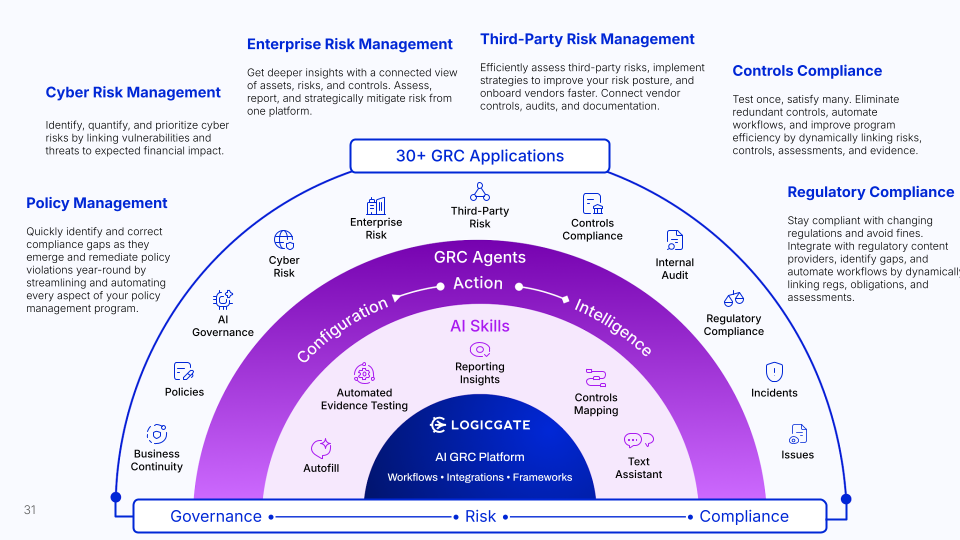
Connecting risk, controls, policies, exceptions, and compliance in one platform gives you three things: informed decisions, less chasing, and better prioritization. Programs often start small to deliver value quickly, but the silos and dependencies remain until the connections are built.
What Does a Connected Cyber Risk Assessment Look Like?
Technical Account Manager, Jerry McElyea, shared a simple cyber risk assessment example with two questions: inherent risk and residual risk. Understanding the residual risk requires knowing which controls are in place. Each app connection adds context. In this example:
- Control testing. A control may exist, but the last control test shows it is ineffective. Jerry’s example: a lock on the door that a credit card can open.
- Policy management. If the control is a policy, you can see its lifecycle. A policy not updated since 2021 may not reflect current risks.
- Exceptions management. A new policy with 274 exceptions granted last month is not really a policy.
- Regulatory compliance. Mapping the control to obligations shows the compliance impact behind the risk.
All of that information flows into the cyber risk assessment and it gives the full context of a risk decision. The result is a decision made with the full picture, not a partial one.
What Are the Three Benefits of Connected GRC?
- Informed decisions. You see the complete context behind each risk rating.
- Less chasing. Automated reminders and status updates replace spreadsheet follow-ups.
- Better prioritization. You can see which mitigation touches a risk, a control, a policy, and a regulation. That shows where to direct time, resources, and budget.
How Does Connected GRC Help Every Team?
The connections work in both directions. Each team gains visibility without asking another team for a report.
- Enterprise risk management sees aggregated cyber risk with its mitigations and dependencies.
- Compliance sees control status against regulations.
- Policy owners see how many exceptions exist before rewriting a policy.
- Exception approvers see the risk impact before approving an exception.
- Audit can pull status and corrective action plan updates directly, without chasing teams.
How Do You Bring Other Teams into Your GRC Program?
Map who sends you data, who needs your data, and which spreadsheets you can retire. Then build the connected picture with those teams. Jerry noted that projects often lose momentum after vendor selection, when priorities shift and early excitement fades. A clear map helps you rebuild buy-in.
Three questions guide the work:
- Who sends you the data you need?
- Who needs your data?
- Where are the spreadsheets?
Then talk to your peers. If you work in cyber, talk to enterprise risk. If you work in risk, talk to compliance.
Ask where each team needs more information and where they want to stop chasing. Bring your account team in to build a data diagram roadmap and an ROI wish list. Share where you want to save time and break down silos.
Which Risk Cloud Features Do Practitioners Wish They Had Known About?
Each speaker also named features they wish they had found earlier as a customer.
| Feature | What it does | How to find it |
|---|---|---|
| Edit All Fields entitlement | Exposes every front-end and back-end field so admins can correct data without reassigning a record or moving it to another step | A module entitlement on a role; reserve it for admins and power users |
| Editable table reports | Edits multiple records inline from a table report while respecting existing permissions | Enable “Edit records in table report” in the table report settings. The “Edit Records” option will then appear (when you can edit a value depends on your permissions) |
| Recently viewed | Shows the last five records, reports, and dashboards you opened | The clock icon in the top-right corner of the platform |
| Favorites | Collect your favorite reports, dashboards, and records in one place | Select the favorite button on each item for it to appear when you click the heart icon in the top-right corner of the platform |
What GRC Best Practices Can You Act on This Month?
Start with these six actions from the webinar speakers.
- Audit your current access setup, remove one-off user assignments, and add users to roles only.
- Build an access matrix with every application owner before your next build.
- Ask your CSM or TAM about an application health check for older applications.
- Pick one new feature and pilot it in a dev environment or a single workflow.
- List who sends you data, who needs it, and which spreadsheets you can retire.
- Share your goals and your ROI wish list with your account team.
If you’re ready to see a connected GRC program in action, request a demo today.
Frequently Asked Questions
What Is the Difference Between Roles, Permission Sets, and User Groups?
Roles define which platform tools a person can use. Permission sets control read and write access at each workflow step. User groups restrict which records a person can see.
Why Should You Add Users to Roles Only?
Assigning permission sets user by user creates an administrative problem when someone changes teams or leaves. Keeping permission sets inside roles, and users inside roles, makes access changes simple to manage.
When Should You Engage Your Account Team?
Engage your customer success manager or technical account manager before you build, on a regular cadence, and when your goals change. Also schedule a health check for applications that are three to five years old.
How Do You Adopt New Features Without Disrupting Production?
If you have a secondary, development environment, configure and test the feature there first. If you do not, pilot it in a single workflow, step, or functional team before rolling it out.